Do a Job · Everyday · 3 min
Come back to a room, or read it afterwards
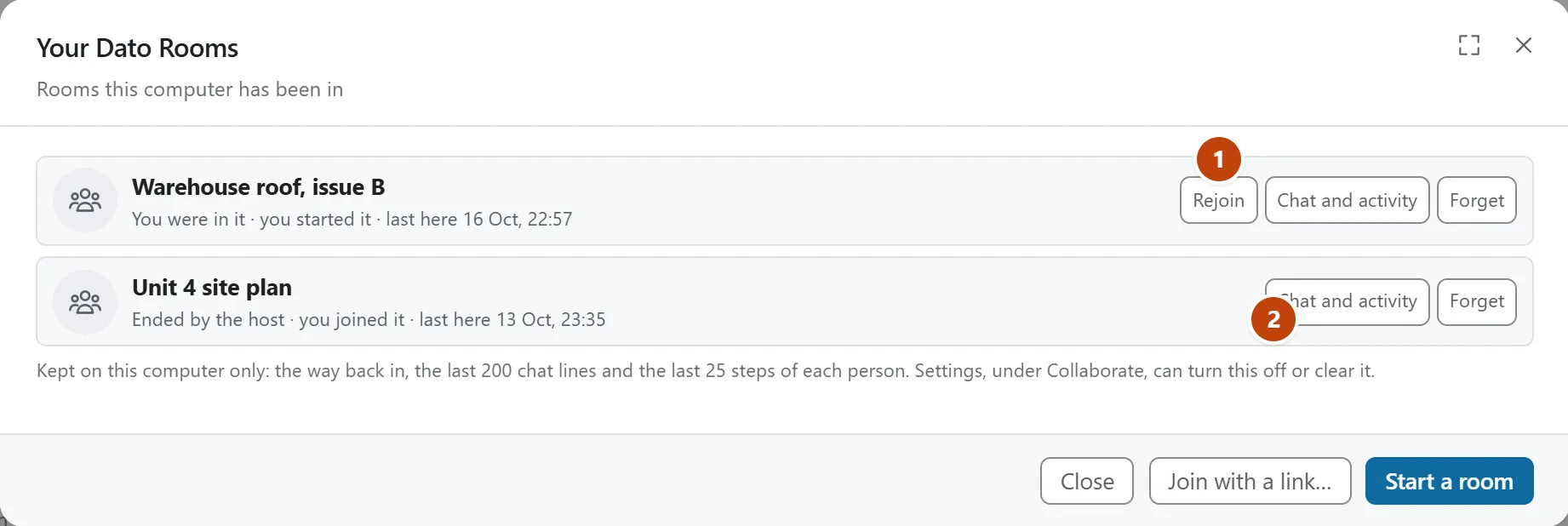
Leaving, or closing the page, doesn’t lose a room: go back in while it’s open, and read its chat and activity afterwards.
DatoMark remembers the rooms you have been in, on this computer only: the way back in, the last 200 lines of chat and the last 25 steps of each person. It’s a fixed, small amount, however long the room ran.
Go back in
- Choose Room. If you have been in rooms before, it opens Your Dato Rooms.
- Choose Rejoin on the one you want. You’re back in with its chat and activity as they were.
If the page was closed or reloaded while you were in a room, it offers to take you back in once, as a message when DatoMark opens. After you Leave on purpose, the message that follows has Rejoin on it too.
Read a room that has finished
Chat and activity shows what was kept of a room, even when it has ended or run out, and lets you save the chat as a text file. Forget removes a room from the list.
Keep it or clear it
Settings › Collaborate › Earlier rooms turns remembering off and clears the list. The list holds your last six rooms.
In DatoMark Your Dato Rooms